01
Record payments manually
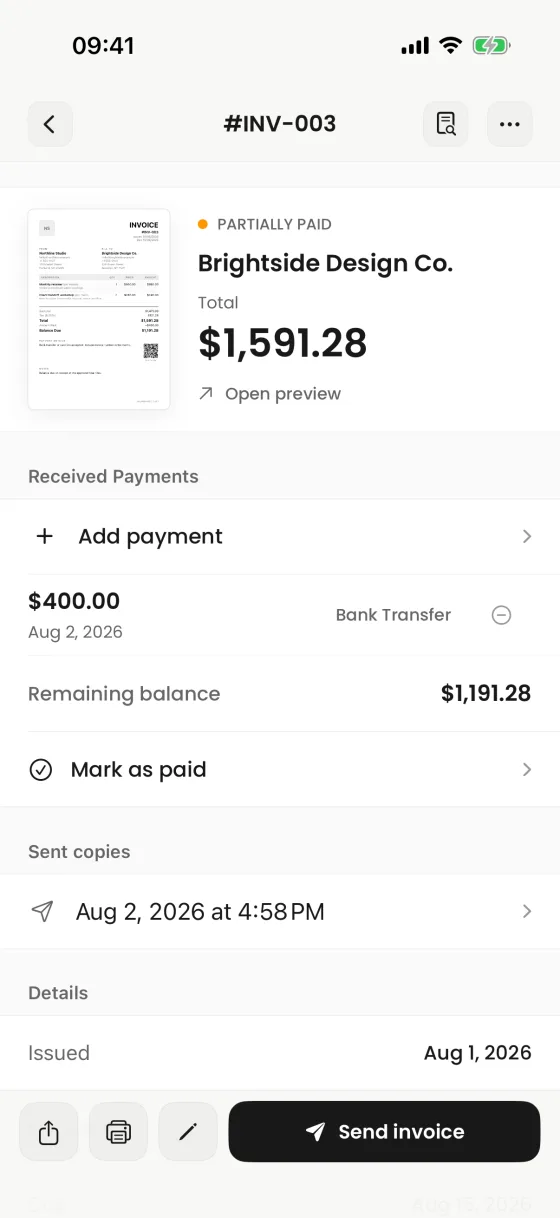
Add an amount, date, and payment method after money arrives through the channel you use.
Record a payment, review the remaining balance, mark an invoice paid, and keep the history next to the document—without pretending to be a payment processor.
Clear manual records and balances, controlled by you.
What it helps you do
01
Add an amount, date, and payment method after money arrives through the channel you use.
02
Paid, partial, unpaid, and overdue views keep document status and balance easier to scan.
03
Review payment entries and confirmed sent copies from the invoice detail workspace.
Clear product boundary
Invoices does not process cards or bank transfers and does not automatically reconcile a provider. Payment links and QR codes are provider-neutral URLs; payment status changes when you record it.
FAQ
No. It can include your payment instructions or link, but payment processing happens outside the app.
No. You record the payment or mark the invoice paid after confirming it through your payment provider.
Optional due-soon and overdue reminders can be scheduled locally on your iPhone, subject to notification settings and device delivery.
Invoices for iPhone
Create it on iPhone, inspect the real PDF, and share it when every detail is right.