01
Professional estimate PDFs
Add services, quantities, rates, tax, notes, terms, branding, and a valid-until date.
Prepare a polished estimate or quote with the same clients, services, branding, and PDF controls you use for invoices, then convert it when the work is approved.
Estimate and invoice stay inside one focused document workflow.
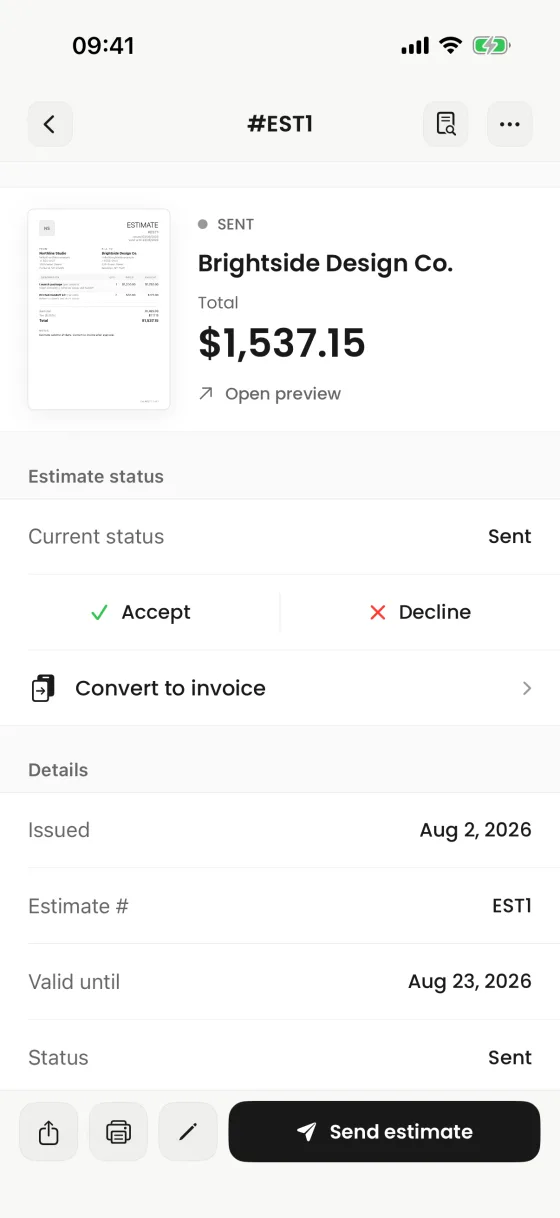
What it helps you do
01
Add services, quantities, rates, tax, notes, terms, branding, and a valid-until date.
02
Keep the current estimate status visible and record accepted or declined work inside the app.
03
Create an invoice from the estimate so the approved scope does not need to be entered again.
Clear product boundary
An estimate can be reviewed, printed, shared, and retained as its own document. Conversion creates the invoice workflow without pretending that client approval or delivery tracking happens automatically.
FAQ
Yes. The estimate detail includes a conversion action that carries the work into an invoice workflow.
Yes. Create and share the proposed work as an estimate PDF, then convert it to an invoice when the work proceeds. The document is labeled as an estimate inside the app.
No. You record the estimate status in Invoices; the app does not claim automated client acceptance.
Yes. Estimates use the same branding and PDF presentation system as invoices.
Invoices for iPhone
Create it on iPhone, inspect the real PDF, and share it when every detail is right.