01
Start from a document
Import a supported PDF or image when retyping an existing invoice would slow you down.
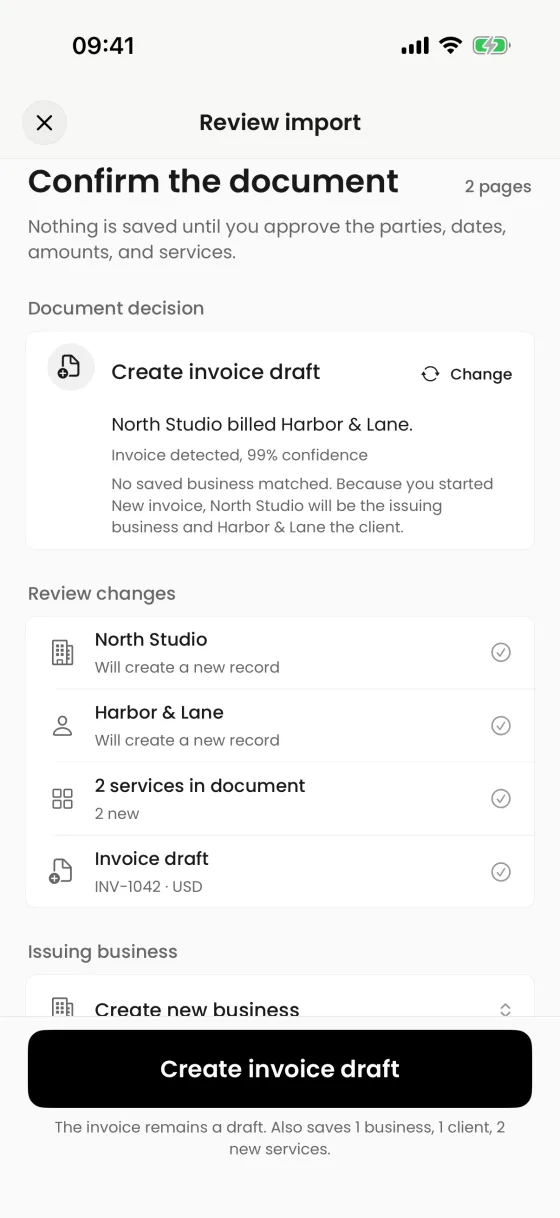
Premium AI can extract business, client, service, date, and amount details from a supported document. Nothing is saved until you review the result.
AI proposes. You approve.
What it helps you do
01
Import a supported PDF or image when retyping an existing invoice would slow you down.
02
Confirm which business is issuing, which client is billed, and which services become line items.
03
The result enters the normal invoice editor so dates, parties, amounts, tax, text, and design remain under your control.
Clear product boundary
Extraction is a starting point, not an accounting decision. The review screen explains what was recognized and what new records may be created before the draft is saved.
FAQ
No. AI import creates an editable draft only after your review. You decide when and how to share it.
Yes. The created invoice remains editable in the standard document workflow.
AI import is a Premium AI feature. The app shows the relevant upgrade options when you start that workflow.
Invoices for iPhone
Create it on iPhone, inspect the real PDF, and share it when every detail is right.